



Logos belong to their owners and show where you can save from. They are not endorsements.
- Share from any app Saved without opening Ideafex, even offline.
- Ideafex keeps the text Pro adds article text and transcripts.
- Find it or ask AI Search your wall, or connect your AI on Pro.
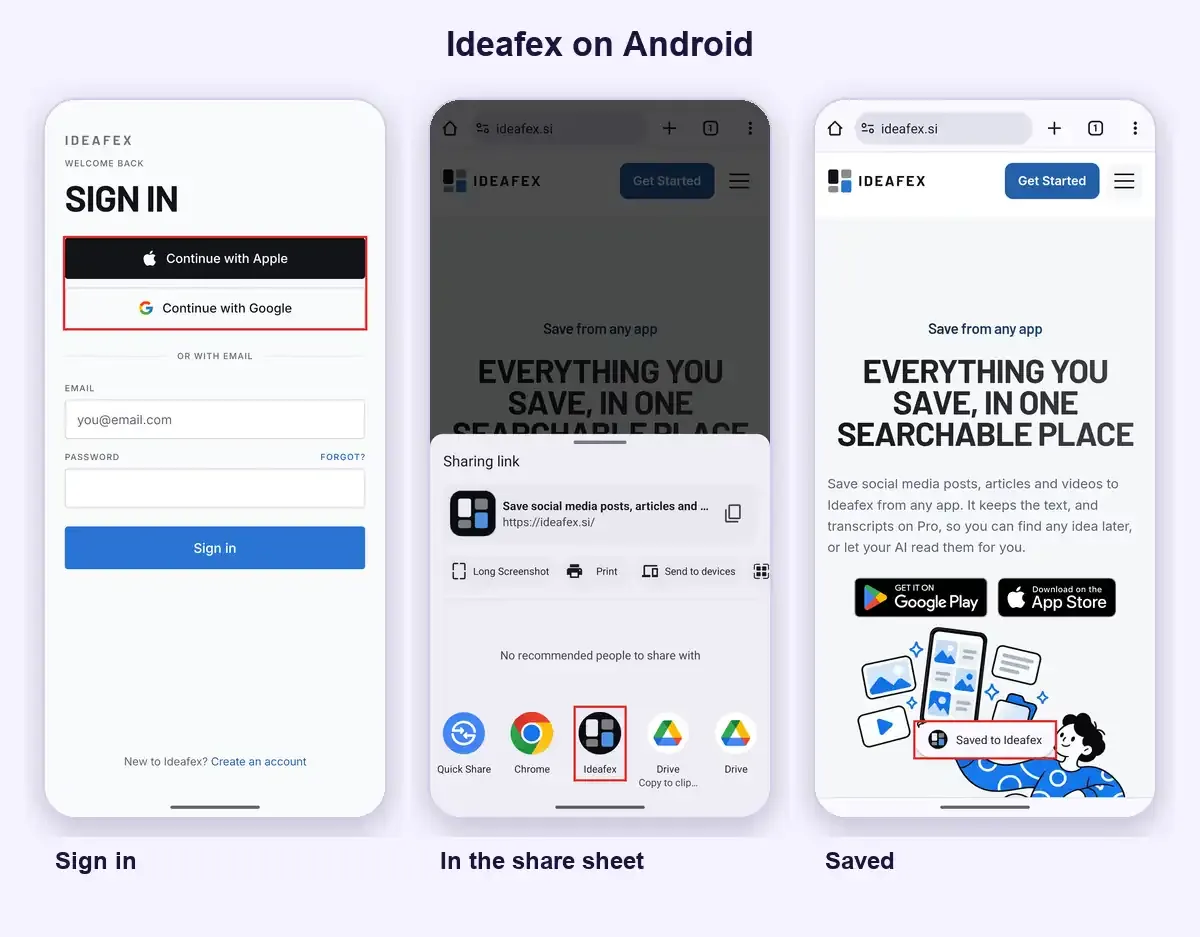
Good things you find while scrolling get lost fast. Ideafex puts them in one place. On Android, tap Share in any app and choose Ideafex. The idea is saved without opening the app, and you carry on scrolling. Install it from Google Play at the top of this page, or open the web app.
What does the Ideafex Android app do?
- Share sheet capture. Pick Ideafex in the share sheet of any app. Share a few links or photos together and they become one idea.
- Works offline. Saving works with no signal, and your changes sync later.
- Nested folders. Sort ideas into folders you can nest, and filter the wall by platform.
- Search. Search the words in your captions and notes. On Pro it also covers article text and transcripts.
- Connect your AI. On Pro, let Claude, ChatGPT or Cursor read your ideas, read-only. See Connect your AI.
How do you save posts, links and videos from the Android share sheet?
Ideafex shows up in the Android share sheet next to your other apps. Found an Instagram post, a TikTok video or an article worth keeping? Tap Share, choose Ideafex, and it lands on your wall. You do not have to open Ideafex first, and it works with no signal.
The card appears right away. Ideafex then fetches what it can for the link, such as the caption and author. Fetching is best-effort, so what you see depends on what each site allows. YouTube links are kept as a preview only, with no transcript.

Which Android versions does Ideafex support?
Ideafex runs on Android 7.0 (Nougat) or later. Install it from Google Play. Your ideas sync with the iPhone app and the web app when you sign in with the same account.
Is Ideafex free on Android?
Yes. Ideafex is free on Google Play. Free gives you unlimited ideas, capture from the app, the share sheet and the web, search, link previews and up to 3 folders.
Pro adds fetched media, article text and transcripts, unlimited folders and Connect your AI. One Pro plan covers all your devices. See the pricing page for plans.
How do you organise what you save?
Sort ideas into folders that fit how you think. Nest folders inside each other, and put one idea in more than one folder. When you only want to see one kind of thing, filter the wall by platform.

Can you search what you saved, or ask your AI?
Search finds words in the text Ideafex keeps for each idea, not just titles. With Pro, that includes article text and transcripts. Pro also lets you connect Claude, ChatGPT, Cursor or another MCP-compatible assistant. Access is read-only and you approve it by signing in. Read how read-only AI access works.
Prefer a bigger screen? Use the web app with the same wall. On iPhone? Get the iPhone app. Want to see what changed recently? Read the changelog.
Questions about the Ideafex Android app
Ideafex is built for it. You tap Share in any app, choose Ideafex, and the post, article or video lands on one searchable wall. If you only need to bookmark a page in your browser, the browser already does that.
Yes. It is free on Google Play. Free keeps the link and your note, with search and up to 3 folders. Pro adds fetched media, article text and transcripts, unlimited folders and Connect your AI. Pricing is on the pricing page.
Yes. Tap Share in the app, choose Ideafex, and it is saved without opening Ideafex. What Ideafex fetches is best-effort and depends on what each site allows.
Android 7.0 (Nougat) or later.
Saving works offline. Your changes sync when you are back online.
Yes, on Pro. Article text and transcripts are kept, so search finds words inside them. YouTube links are kept as a preview only, with no transcript.
Yes. The iPhone app is on the App Store, and the web app works in any browser at app.ideafex.si.
Save it once, find it later
Save posts, articles and videos from any app to one searchable wall. Ideafex is free on the App Store, Google Play and the web at app.ideafex.si.


Related reading

Ideafex Web App: Your Saved Ideas on Any Computer
The Ideafex web app opens your wall in any browser: add links and notes, search, sort into folders, filter by platform and manage your plan.
Read more →
Connect Claude or ChatGPT to saved ideas (MCP)
A read-only MCP connection that lets your AI assistant search and read the posts, articles and videos you saved in Ideafex.
Read more →
Ideafex for iPhone: Save Posts, Articles and Videos to One Wall
An iPhone app that saves posts, articles and videos from any app's share sheet to one searchable wall, with folders, search and a web app.
Read more →