
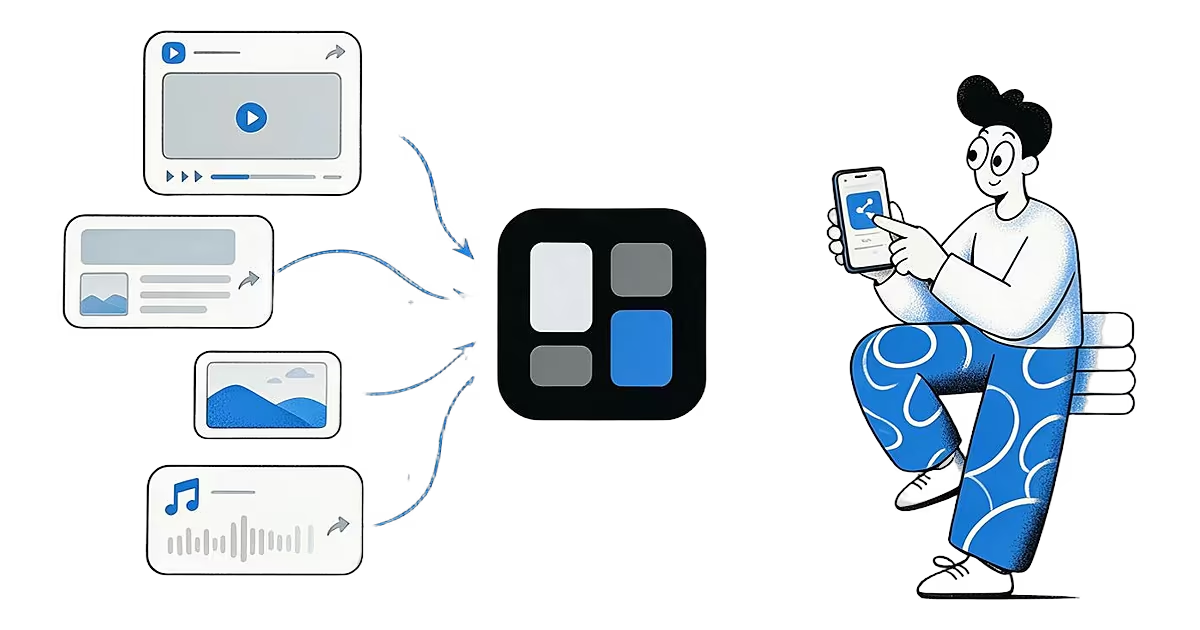
The share button is the one thing every app agrees on. Instagram, TikTok, X, Reddit, YouTube, Chrome, Safari, your photo gallery and your files app all have one, and they all open the same system menu, called the share sheet. Ideafex adds itself to that menu, so you can save from anywhere with the same two taps. Our glossary explains what a share sheet is if the term is new.
How do you save from any app with the share sheet?
- Find the thing you want to keep: a post, an article, a video, a photo, a file or a passage of text.
- Tap Share. Depending on the app it may be an arrow, a paper plane or an option in the three-dot menu.
- Pick Ideafex.
- A "Saved" message appears, the share sheet closes and you are back where you were.
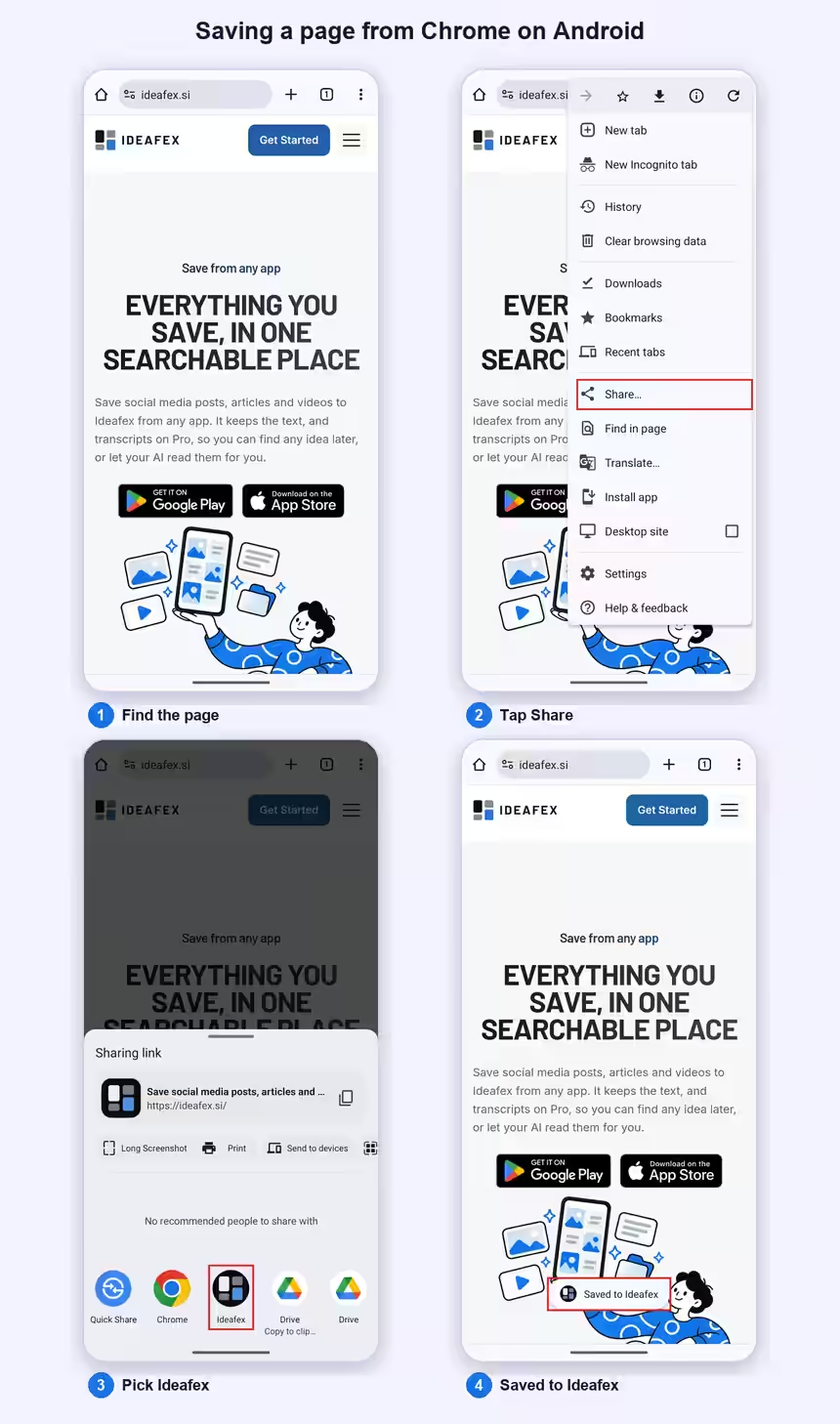
That is the whole flow. You do not have to open Ideafex, choose a folder or wait for an upload. The idea appears on your wall and fills in by itself.
How does sharing work on Android?
On Android, apps open the system Sharesheet when you tap Share. Google's developer guide describes it as the standard way to send content to other apps, and asks apps to use it instead of building their own share menus (Android Developers: Send data to other apps). Ideafex is one of the apps that can receive what you share.
- Tap Share in the app.
- Look for Ideafex in the list of apps. The list is ordered by the system, so Ideafex may move. Scroll if you do not see it at first.
- Tap it. You see "Saved" and stay in the app.
Some apps show their own share options first, such as "Copy link" or "Send to a friend". Look for the option that opens the full system share menu, often called "More" or "Share via", then pick Ideafex. Get the app on the Android app page.
How does sharing work on iPhone?
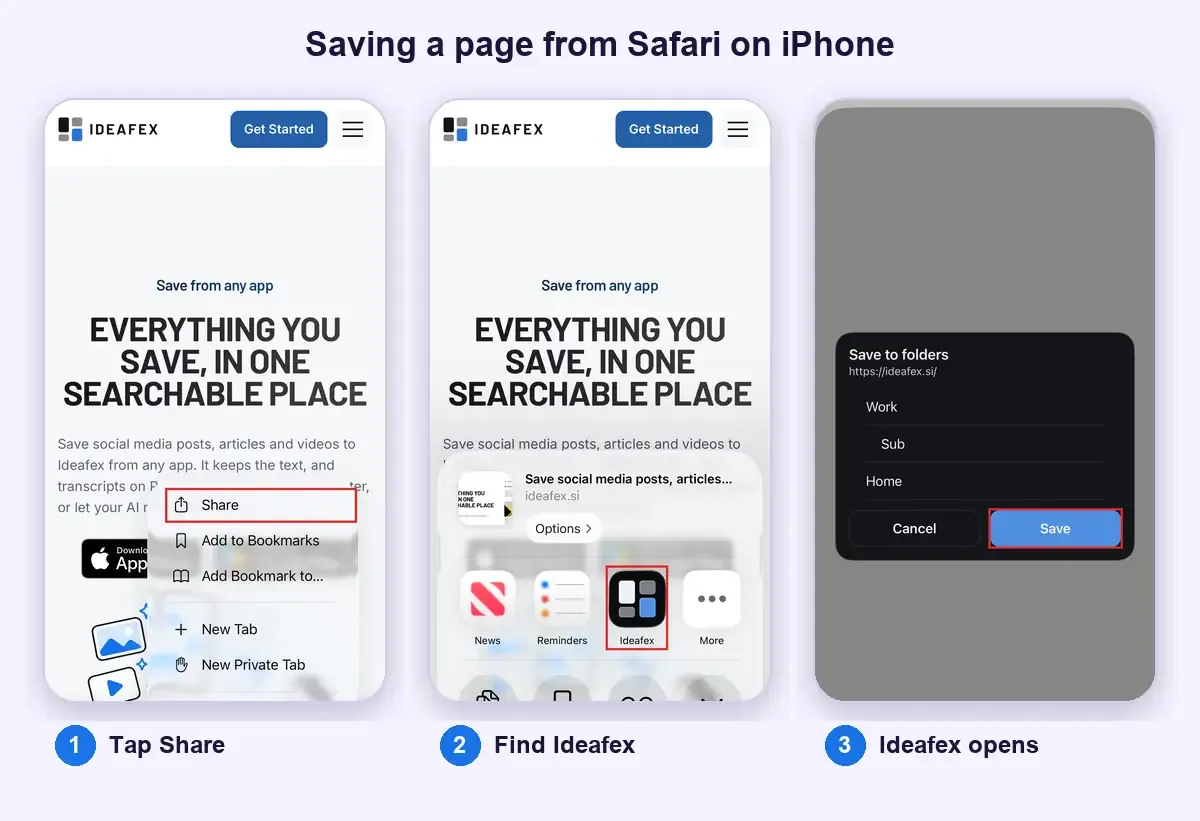
On iPhone, Ideafex adds a share extension to the share sheet.
- Tap Share in the app.
- Look along the row of app icons for Ideafex. The first time, it may be hidden at the end of the row behind More. From there you can add it to your favourites so it stays near the front. Apple's guide Customize sharing options on iPhone shows how.
- Tap Ideafex. You see "Saved", the sheet closes and you stay in the app.
More about the app is on the iPhone app page.
What about the web app?
Browsers on a computer do not have a phone-style share sheet for Ideafex. In Chrome, Edge and Firefox, the Ideafex extension saves selected text, screenshots and links from the page you are on. In the web app you tap the + button and choose Paste link, Note or Image. The same + button is in the phone apps for when you want to write a note or paste a link yourself.
What can you share?
- Links to posts, articles, videos and pages, with any text the app sends along.
- Highlighted text. Select a passage in an app that allows it, tap Share and save just that passage.
- Images. Share several photos at once and they become one idea with a swipeable carousel.
- Video files from your gallery.
- Other files such as PDFs, documents and audio. A PDF shows its first page as a preview, audio shows a voice icon, and other documents show a file icon with the file name.
What happens after you tap Ideafex?
- It saves instantly. The upload runs in the background, so you never wait on it.
- It works offline. With no connection, the idea is queued on your phone, still shows "Saved", appears on your wall and uploads when you are back online. See offline sync.
- It spots duplicates. If you share a link you already saved, Ideafex says "Already saved" and offers to open it instead of making a second card.
- It detects the source. Ideafex works out the platform and, where it can, the author or page title, without asking you anything. If it gets the source wrong, you can edit it later.
- It fills in on Pro. On Pro, Ideafex fetches the caption, article text, media and transcripts of videos it can download, best-effort. On Free, a link keeps its preview with the title and icon.

Which apps does it work with?
Any app that offers a Share button for links, text, images or files. Ideafex recognises many platforms by name and shows their icon, including Instagram, TikTok, YouTube, Facebook, X, Reddit, Pinterest, LinkedIn, Threads, Bluesky, WhatsApp and Telegram. Anything else is saved as a website with its page title and icon. The guide to saving social media posts in one place walks through the most common apps. For Reddit in particular, there is a separate guide to saving Reddit posts and searching them later.
What are the limits?
- Source detection is best-effort. Chat apps usually do not pass the contact's name, and the phone does not always say which app shared something. You can correct the source in the idea's detail view.
- Fetching depends on each site. Media and captions are fetched on Pro when the site allows it. YouTube is saved as a preview only, with no transcript.
- Some apps limit what they share. If an app only shares a link, that link is what Ideafex receives.
- The browser extension is on Chrome, Edge and Firefox. In those browsers, use the Ideafex extension; in other browsers, such as Safari, paste links into the web app.
Plans and what each includes are on the Ideafex pricing page.
Your next idea is one share away
Install Ideafex on Android or iPhone and it appears in your share sheet straight away.


Questions about sharing to Ideafex
Save it once, find it later
Save posts, articles and videos from any app to one searchable wall. Ideafex is free on the App Store, Google Play and the web at app.ideafex.si.
Related reading

What Is a Share Sheet? iPhone and Android Explained
The panel your phone shows when you tap Share, listing the apps and actions that can receive what you are looking at.
Read more →
Offline sync: save offline on your phone, see it on the web
Capture, edits, folders and search keep working with no signal, and everything syncs to your other devices and the web in the background.
Read more →
Save social media posts from every app in one searchable place
Share posts from Instagram, TikTok, X, Reddit or any other app to one searchable wall, then find them again by platform, folder or what they said.
Read more →