

Folders are optional in Ideafex. You can save for months and find everything with search. But once you have a few hundred ideas, a handful of folders turns the wall into something you can browse: Recipes, Trip to Lisbon, Thesis, Gift ideas, Work.
How do you organise saved posts into folders?
- Open the drawer. Tap the menu icon at the top left of the wall to open the folder drawer.
- Create a folder. Tap New folder, give it a name and choose where it sits: at the top level or inside another folder.
- Add ideas to it. Open an idea and add it to one or more folders from its detail view. That is the one place where ideas go into folders, which keeps the wall simple.
- Browse. Tap a folder in the drawer and the wall shows only that folder's ideas. "All ideas" at the top takes you back.

It works the same way for every app you save from, because every saved post becomes an idea on the same wall. See share from any app for how ideas get there.
How do nested folders work?
A folder can hold other folders, as deep as you need. The drawer shows them as a tree you can expand and collapse. A sensible start is two levels, such as:
- Travel, with Lisbon, Japan and Weekend trips inside
- Cooking, with Dinners, Baking and Meal prep inside
- Study, with one folder per module or chapter
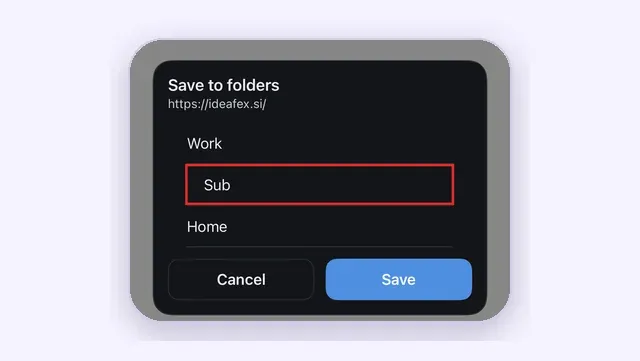
Start small. Two or three folders for the things you save most is enough for the first few weeks, and you can add subfolders when a folder gets crowded. Because ideas can sit in several folders and folders can be moved later with their contents, nothing you set up now locks you in.
When you search or filter inside a folder, ideas in its subfolders are included, so opening Travel shows everything from Lisbon, Japan and Weekend trips together.
Can one idea be in more than one folder?
Yes. Folders in Ideafex behave like labels. A video about a Lisbon bakery can sit in both "Lisbon" and "Baking" without making a copy. Remove it from one and it stays in the other. Folder chips on each card show where an idea lives.

How do you move, reorder and colour folders?
- Drag and drop a folder in the drawer to reorder it, or drop it under a different parent to move it. Its subfolders move with it.
- Swipe a folder row to reveal Edit and Delete.
- Edit lets you rename the folder and pick an icon and a colour. They show on the drawer row and on the folder chips on cards, which makes a long list easy to scan.
What happens when you delete a folder?
Ideafex asks what you want:
- keep the ideas, so they stay in All ideas and in any other folders they belong to
- delete the ideas too
Keeping them is the safe choice if you are only tidying up.
How do folders work with search and the platform filter?
They combine:
- Open a folder.
- Tap the filter icon and pick one or more platforms.
- Type in search.
"Instagram ideas in Cooking that mention lemon" takes three taps and a word. The platform chips only list platforms you actually have ideas from, so you are never scrolling through apps you do not use.
How many folders do you get on Free?
The Free plan includes up to 3 folders in total, and every folder counts, whatever its depth. Three top-level folders, or one folder with two subfolders, both reach the limit. Pro has unlimited folders. Current plans are on the Ideafex pricing page.
If you had more folders on Pro and move back to Free, your 3 oldest folders stay editable and the rest become read-only. You can still open them and read their ideas, and you can delete a read-only folder to get back under the limit.
How is this different from Instagram Collections or X Bookmark folders?
Instagram lets you group saved posts into collections (Instagram Help: create a collection for saved posts), and X lets Premium subscribers sort bookmarks into folders (X Help: About Bookmarks). Both work well inside their own app. Each holds only that app's posts, and a collection there cannot hold a post from somewhere else.
Ideafex folders hold ideas from every app together: an Instagram reel, a Reddit thread, a news article and your own note can share one folder, and nest inside a larger one. The guide to saving social media posts in one place explains the wider set-up, and students will find a folder plan on the students and researchers page.
What are the limits?
- Ideas go into folders from the detail view. You cannot drag a card from the wall into a folder or select several cards at once.
- There are no tags or favourites. Folders are the one way to group ideas.
- Folders are private to your account and cannot be shared with other people.
- Free includes 3 folders in total. The FAQ covers plans in more detail.
Give your saves a shape
Save from any app, then sort ideas into nested, coloured folders when you are ready.


Questions about folders
Open the drawer, tap New folder and choose where it sits. Then open an idea and add it to one or more folders from its detail view.
Yes. Folders work like labels, so one idea can sit in several folders without a copy. Removing it from one leaves it in the others.
Yes. Folders can be nested as deep as you need, and you can drag a folder under a different parent to move it with its subfolders.
Free includes up to 3 folders in total, counting folders at every depth. Pro has unlimited folders. See the Ideafex pricing page.
Save it once, find it later
Save posts, articles and videos from any app to one searchable wall. Ideafex is free on the App Store, Google Play and the web at app.ideafex.si.
Related reading

Save social media posts from every app in one searchable place
Share posts from Instagram, TikTok, X, Reddit or any other app to one searchable wall, then find them again by platform, folder or what they said.
Read more →
Save research articles and videos, then search what they said
Save articles, videos and posts from your phone while you research, keep each source for citing, and search the full text and transcripts later.
Read more →
Share from any app: save to Ideafex from the share sheet
Tap Share in any app, pick Ideafex, and the post, link, text or file is saved without leaving the app, even offline.
Read more →